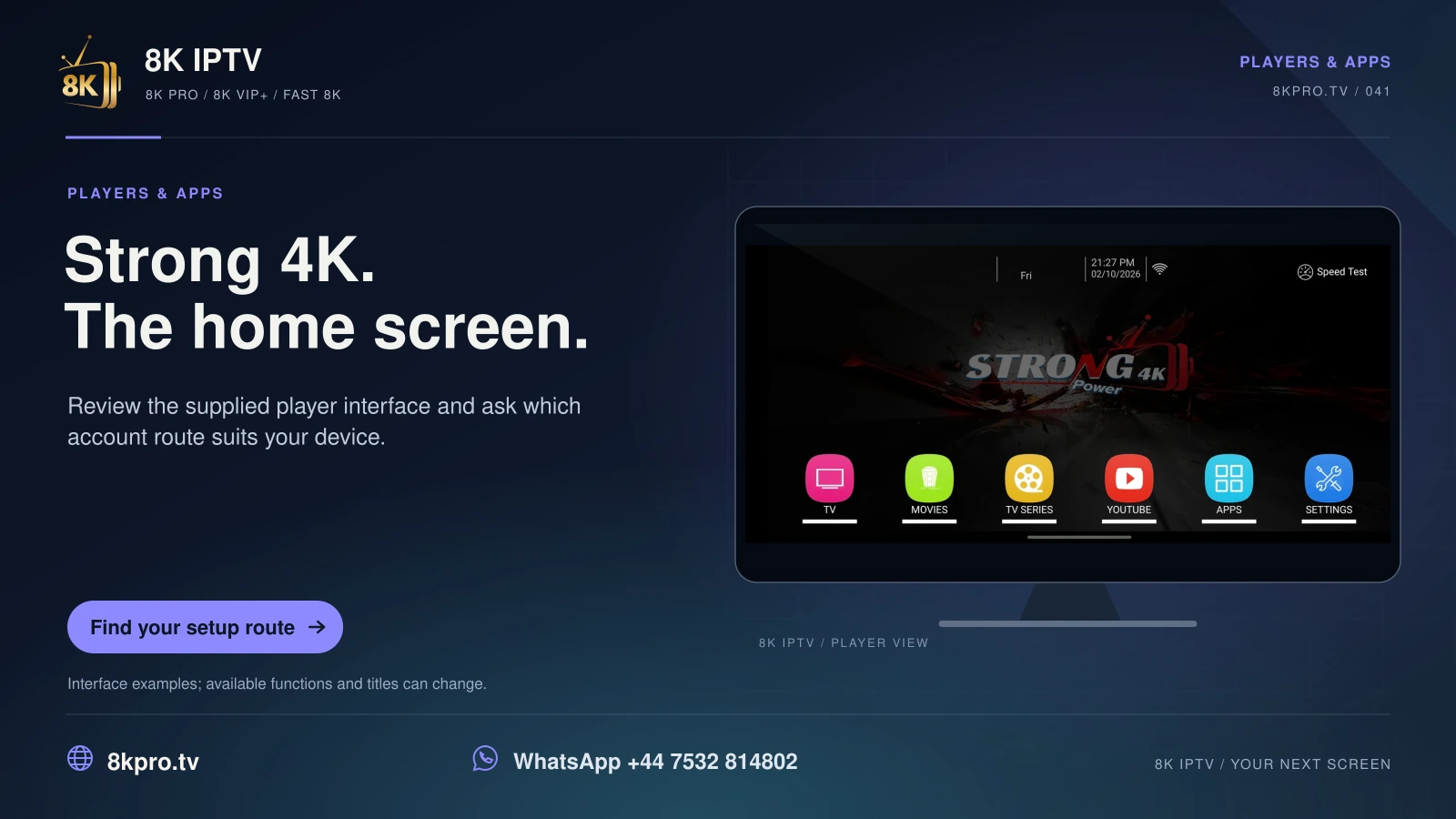
Inside the Strong power screens
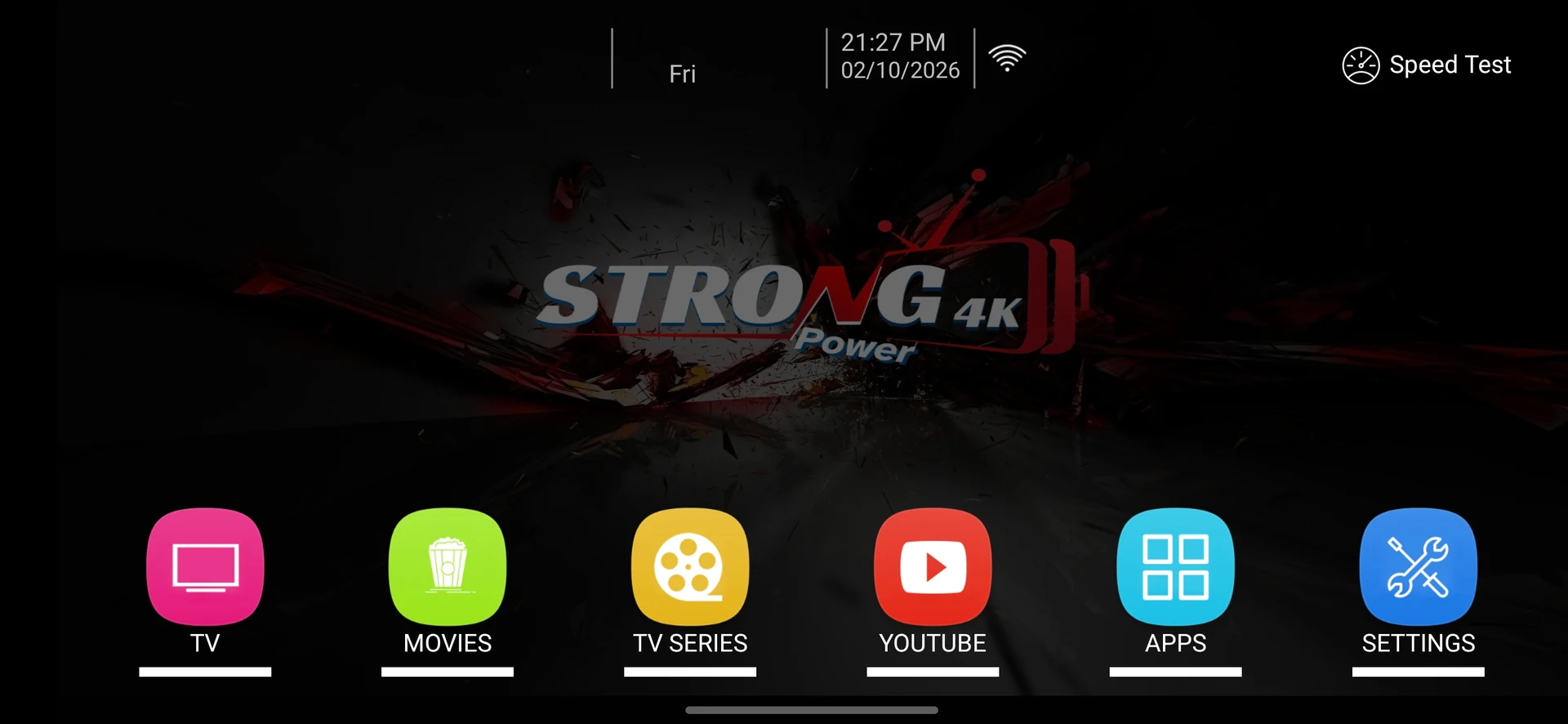
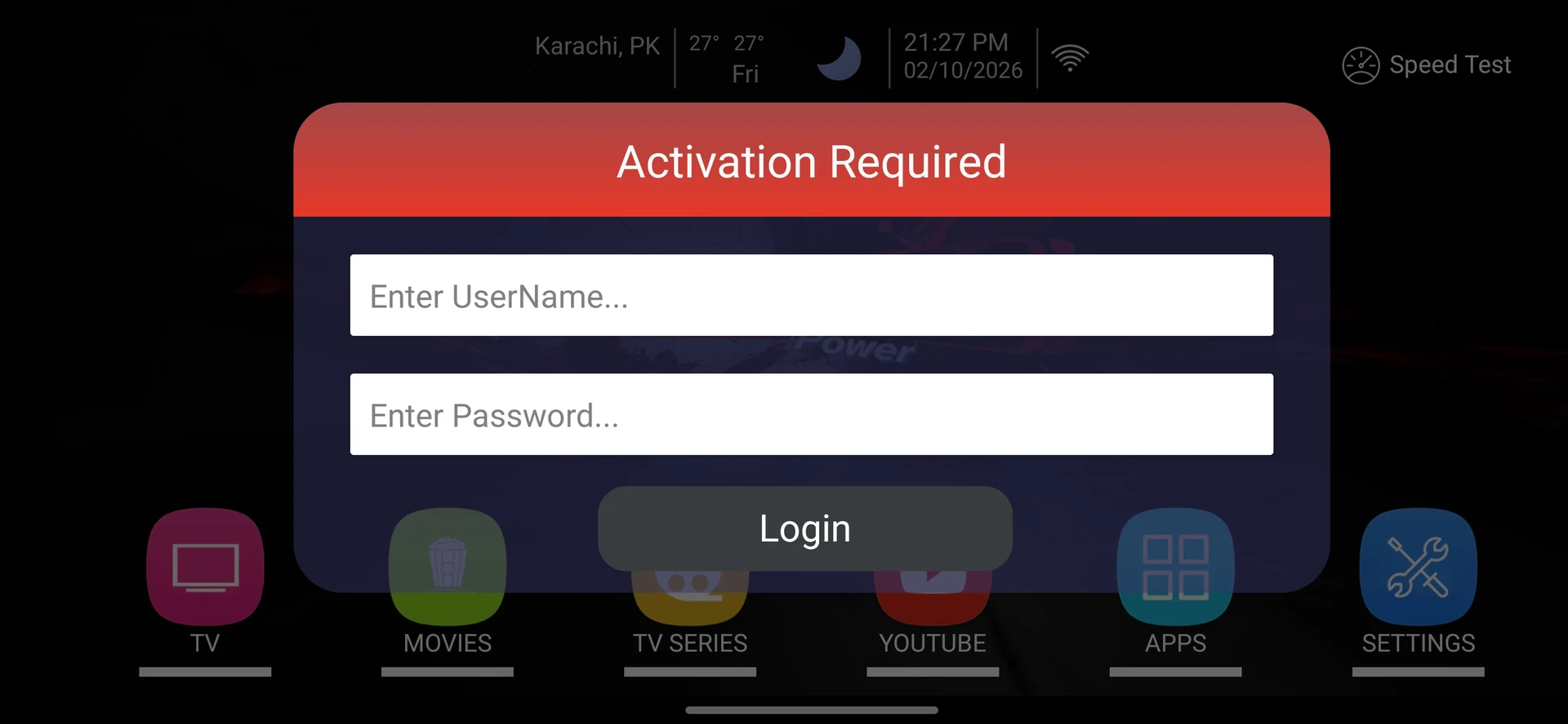
The Strong 4K Power home screen has TV, Movies, TV Series, YouTube, Apps and Settings controls. The activation screen requests username and password. Ask support whether the listed Strong power code 8897049 is the correct current build for your device.
A visible app or YouTube tile does not establish an additional subscription entitlement. Test the issued IPTV account on one live source and check remote navigation before changing the installation.
8K IPTV · apps
Your player and account

Strong 4K Power
This listed player uses its own account method. Confirm the current supported build.
Player preview. Match the app, account and device; player fees may apply.
Read the full details
Strong 4K Power
Another player.
Its own login route.
This listed player uses its own account method. Confirm the current supported build.
Player preview. Match the app, account and device; player fees may apply.
OPEN PLAYER GUIDANCE
STRONG 4K POWER
This listed player uses its own account method. Confirm the
current supported build.
PLAYER PREVIEW
Player preview • Confirm your app, account and device • Player fees may apply.
LISTED DOWNLOADER CODE
8897049
CHECK THE PLAYER NAME
PLAYER GUIDE
LISTED DOWNLOADER CODE · 8897049
8K IPTV · app heroes
Player setup in context

Strong power · app guide hero
Match the installed app name and listed Downloader code. Confirm the current package and suitability for your device.
Match the app, account method and device. Confirm current package and licence requirements.
Read the full details
Strong power · app guide hero
Strong power
Match the account.
Match the installed app name and listed Downloader code. Confirm the current package and suitability for your device.
Downloader route · confirm device
M3U
Match the app, account method and device. Confirm current package and licence requirements.
READ THE APP GUIDE
PLAYER GUIDE
STRONG POWER · APP GUIDE HERO
Match the installed app name and listed Downloader code.
Confirm the current package and suitability for your device.
LISTED DOWNLOADER CODE · 8897049
PLATFORMS & BROADCASTERS
SPORTS & EVENTS
YOUR PLAYER. YOUR VIEWING.
LISTED CODE · 8897049
Match the app, account method and device. Confirm current package and
licence requirements.
Installed the app?
WhatsApp us for a one-day free trial.
Tell us your device, Strong power and the account option shown in the player. Support supplies the correct trial login and confirms availability.
The exact provider-listed entry
A further provider-listed Android player. Use the published entry as a starting point and confirm the current destination with support. No version number or separate feature entitlement was supplied.
The entry lists Downloader code 8897049, dated 2026-05-29. It gives no separately verified current build number or universal device compatibility claim. Check the destination and model support before installation.
Provider-code
8897049
Strong power · listed 2026-05-29
Install only on a supported platform
Confirm the actual operating system and whether this build supports the model and intended remote or touch interface. A shortened link can change destination; verify the package name and developer before proceeding.
Android packages are not native Tizen, webOS, iOS or tvOS applications. For those systems, use an appropriate supported store player or an external compatible device. Desktop installers and device MAC activation are separate routes.
Add the account in the correct fields
Open Strong power and ask support which issued account format applies to the installed version. Keep the server address, username and password separate when the app offers that route; use a playlist or portal only when that is what support supplies.
Use the published entry as a starting point and confirm the current destination with support. No version number or separate feature entitlement was supplied.
The player interface does not establish the subscription expiry, connection allowance or access to a specific event. App licensing, where required by a developer, is separate from the service account.
Installed the app?
WhatsApp us for a one-day free trial.
Tell us your device, Strong power and the account option shown in the player. Support supplies the correct trial login and confirms availability.
Test the functions you actually need
Test one live source, one on-demand title, the selected audio output, a subtitle track and guide data where available. Keep the account and device unchanged during the test so the result can be compared with another supported route.
If one source fails while another works, record the exact name and time. If the account cannot sign in, check the account format and expiry first. If only remote controls are awkward, investigate whether the installed build is a TV or touch interface.
Keep a recoverable setup
Record Strong power, the installed version, device and working login format. Use a supported preference export when offered. A normal cache clear and a full app data reset can have different effects on saved credentials and favourites.
For an update or unresolved issue, contact WhatsApp +44 7532 814802 or [email protected] with the exact app name and device. Keep the complete playlist and password out of a public support screenshot.
Fire OS or model-specific operating system
Fire TV Stick
APK compatibility varies by model and operating system; sideloading is not a universal Fire TV instruction.
Read the guideAndroid TV
Android TV
Phone-oriented APKs may install but still be difficult to operate with a television remote.
Read the guideGoogle TV / Android TV
Google TV
The Google TV interface does not make every Android phone application a supported TV application.
Read the guideTizen, depending on model
Samsung Smart TV
Android APKs and Downloader codes cannot be installed directly on a Tizen television.
Read the guidewebOS, depending on model
LG webOS TV
An Android APK is not a webOS app; use a supported native TV player or an external compatible device.
Read the guideAndroid TV
Nvidia Shield
Powerful hardware does not remove a provider account limit or repair a bad source stream.
Read the guideModel-specific Android / dedicated player
Formuler box
Do not convert M3U details into a guessed portal URL or register an unrelated MAC address.
Read the guideModel-specific receiver firmware
MAG box
A portal account and an M3U username/password entry are different setup routes.
Read the guideReceiver-image-specific Linux
Enigma2 receiver
The plugin list contains no executable command; do not paste an unverified shell installer into the receiver.
Read the guideWindows 10 or Windows 11
Windows PC
An APK is not a native Windows installer; do not disable operating-system protections to run a downloaded player.
Read the guidemacOS
Mac
The provider-list entry called 4K Player via MAC describes device MAC activation, not a macOS package.
Read the guideiOS
iPhone
Android Downloader codes do not install APKs on iOS.
Read the guideiPadOS
iPad
A tablet screen does not increase the account connection allowance or guarantee higher source resolution.
Read the guidetvOS
Apple TV
Android APKs and Downloader codes are not tvOS applications.
Read the guideAndroid
Android phone
Television-focused builds may not have comfortable touch controls or reliable background playback.
Read the guideIdentify the actual television operating system
Smart TV
Smart TV is a device category, not a shared app format across Tizen, webOS, Android TV and other systems.
Read the guideModel-specific casting device or Google TV
Chromecast
Installing an application on a phone does not guarantee that its streams can be cast to every Chromecast model.
Read the guideLinux distribution and desktop environment
Linux computer
An Enigma2 plugin is not a general Linux desktop player or a Windows executable.
Read the guideUseful answers
Questions before you continue
What is the Strong power code?
The code is 8897049, listed on 2026-05-29. Confirm the current destination before installing.
Does Strong power include a service subscription?
The player and service account are separate. Confirm the active account and any app licensing requirement.
Are these screenshots specific to every listed player?
Matched screenshots are used where supplied; an illustrative viewing image is used when no screenshot of the exact player was provided.
Explore this viewing option