8K PRO · VIP+ · FAST 8K
Choose the player, then the issued account route.
Download entries and server selections are kept distinct. The interface previews show where each account choice appears.
Desktop & account routes
8K Pro Player
Use the 8K PRO account choice inside a supported VIP+ or Prime player. The list does not identify a separate installer named 8K Pro Player.
Read the guideDesktop & account routes
Strong 4K Player
Strong 4K appears in the source download list with date 21 August 2024 and no direct file link.
Read the guideDesktop & account routes
8K Player Windows 10 App
Use the specifically Windows 10 installer, version 0.2.0.
Read the guideDesktop & account routes
8K Player Windows 11 App
Use the specifically Windows 11 installer, version 0.2.0.
Read the guideDesktop & account routes
8K Player for macOS
The macOS download entry names version 1.0.0 and a DMG file.
Read the guideDesktop & account routes
8K TV Gold
8K TV Gold is a service and player naming enquiry. The gold television logo is used as the original project mark.
Read the guidePlayer directory
Exact names. codes. Clear device routes.
Find the 8K player download entries and choose a compatible installation route.
Code 2057169
8K Player VIP
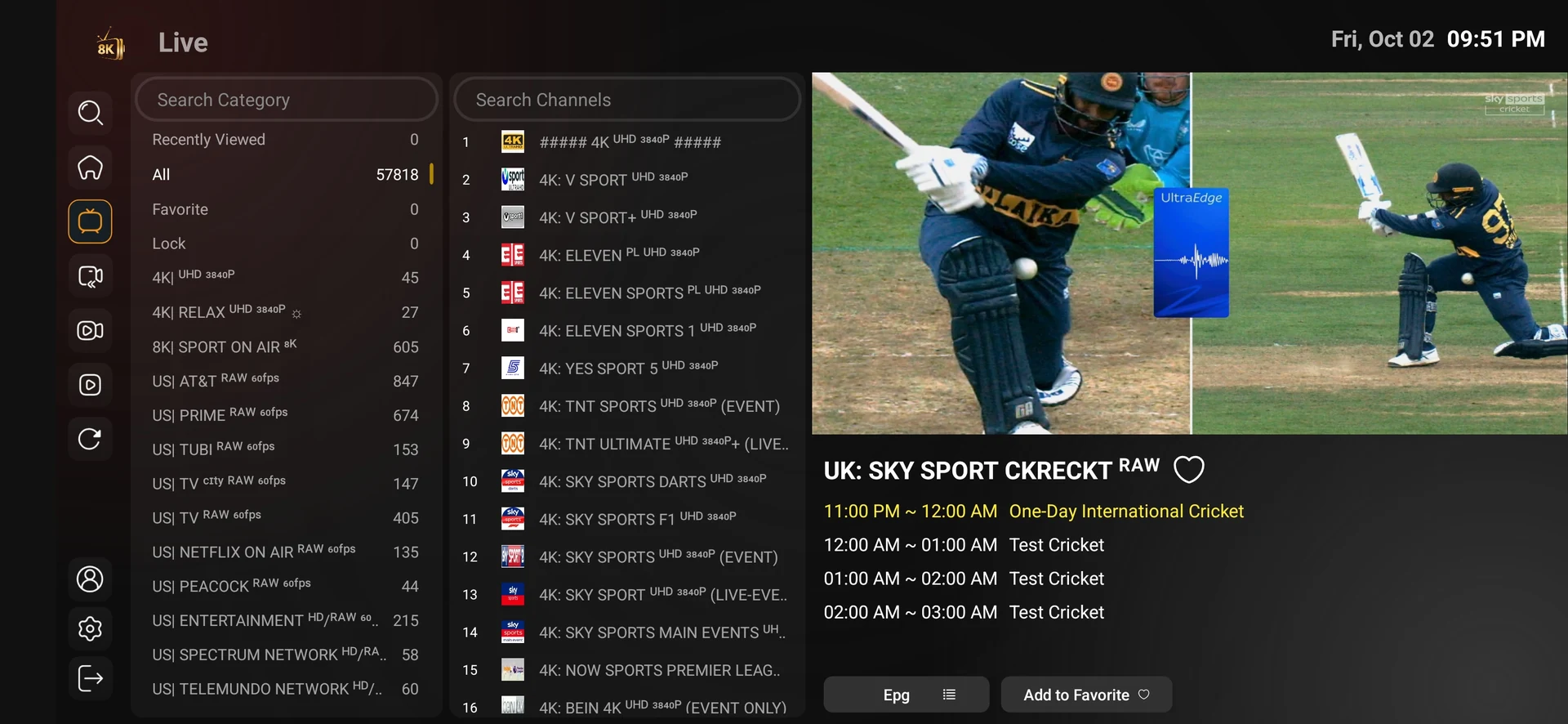
Live television and everyday account access. Start with the account login for this player. The name of an application is separate from the subscription it opens.
Read the guideCode 6844860
8K Player VIP VOD
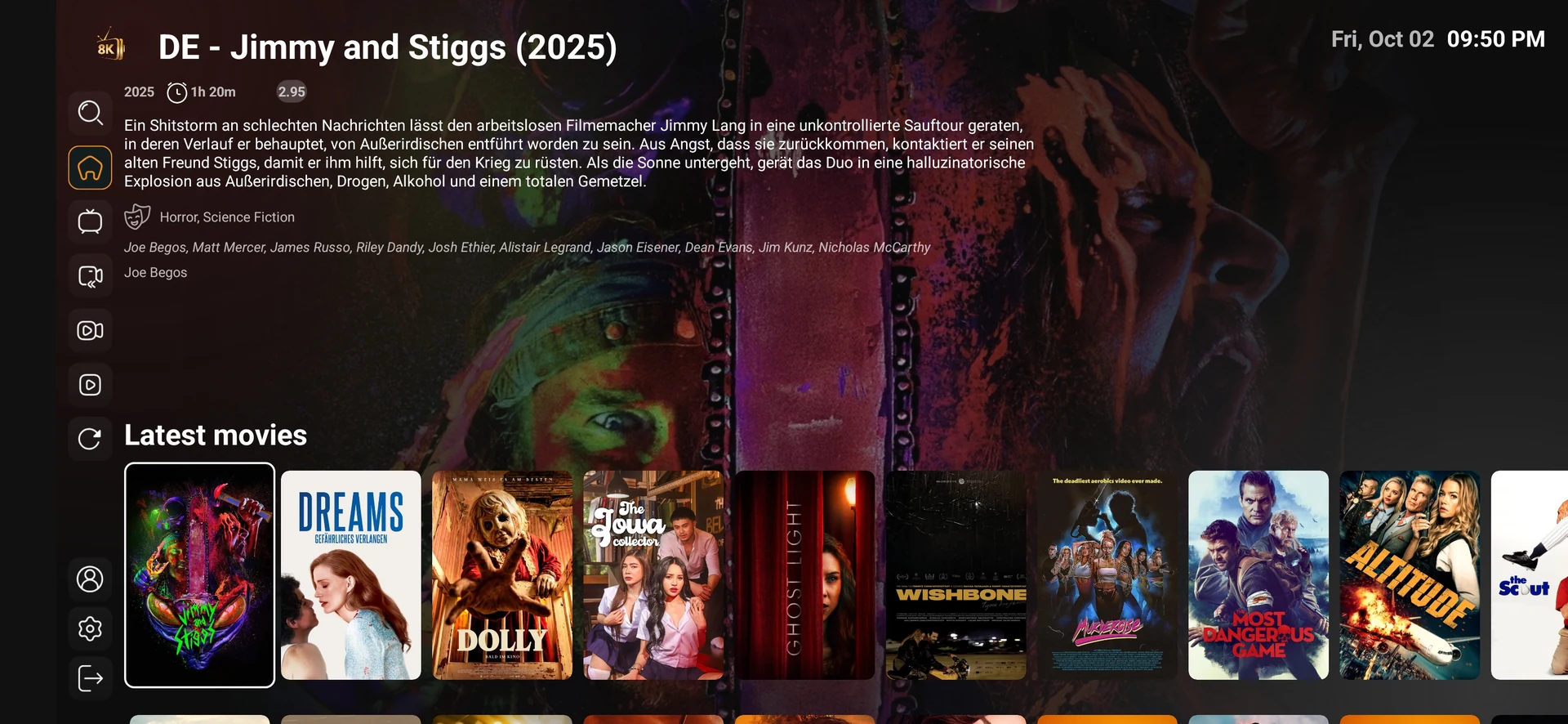
Movies, series and on-demand browsing. Confirm that your account includes the VOD categories you need. A title poster does not establish that a particular language or episode is currently playable.
Read the guideCode 3410676
TiviMate 8K Pro
A provider-listed television player option. This is the provider-listed TiviMate 8K Pro entry. Do not assume that its package, licence or support is the same as the independently distributed TiviMate application.
Read the guideCode 1315630
Fast 8K Player
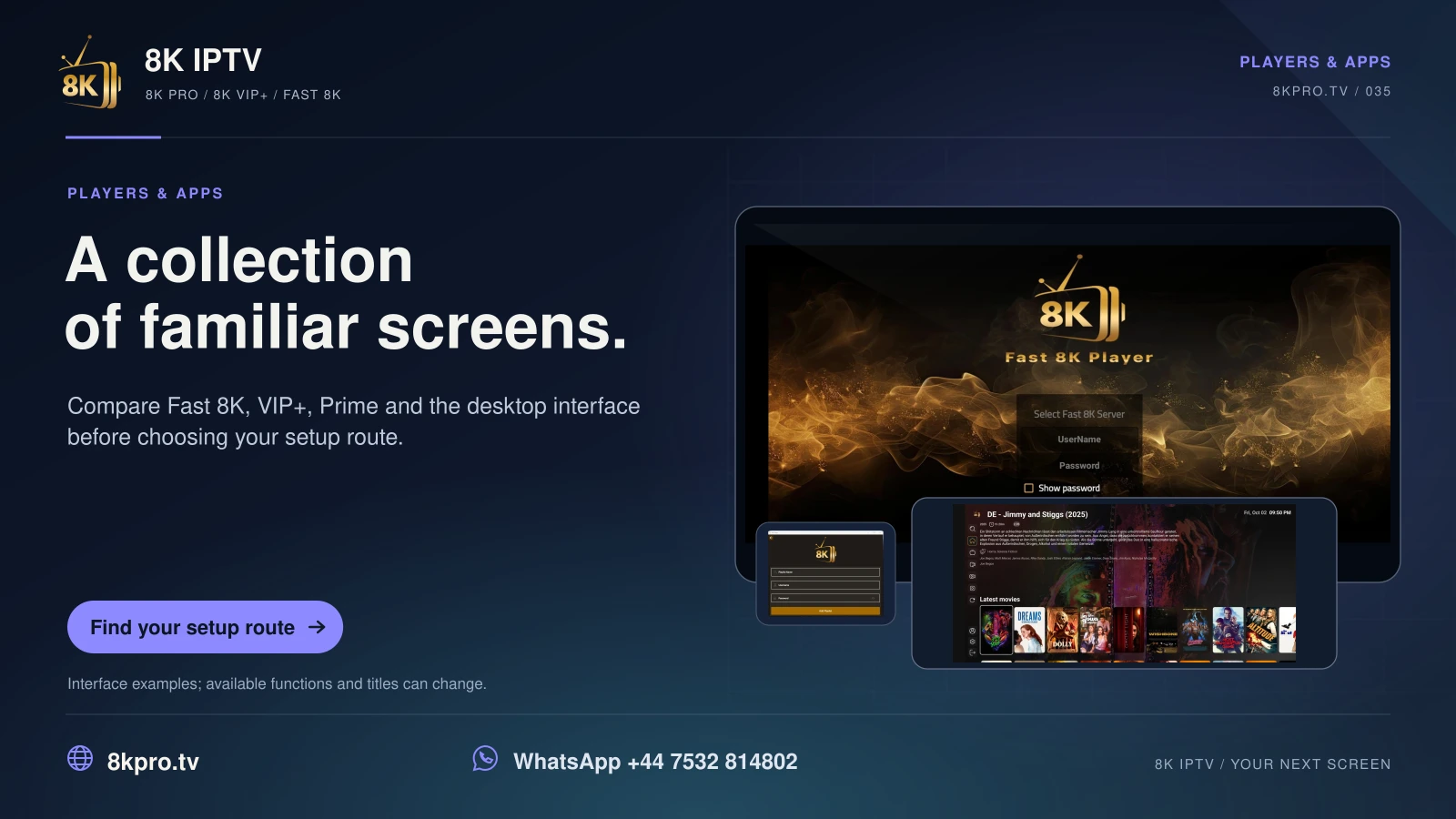
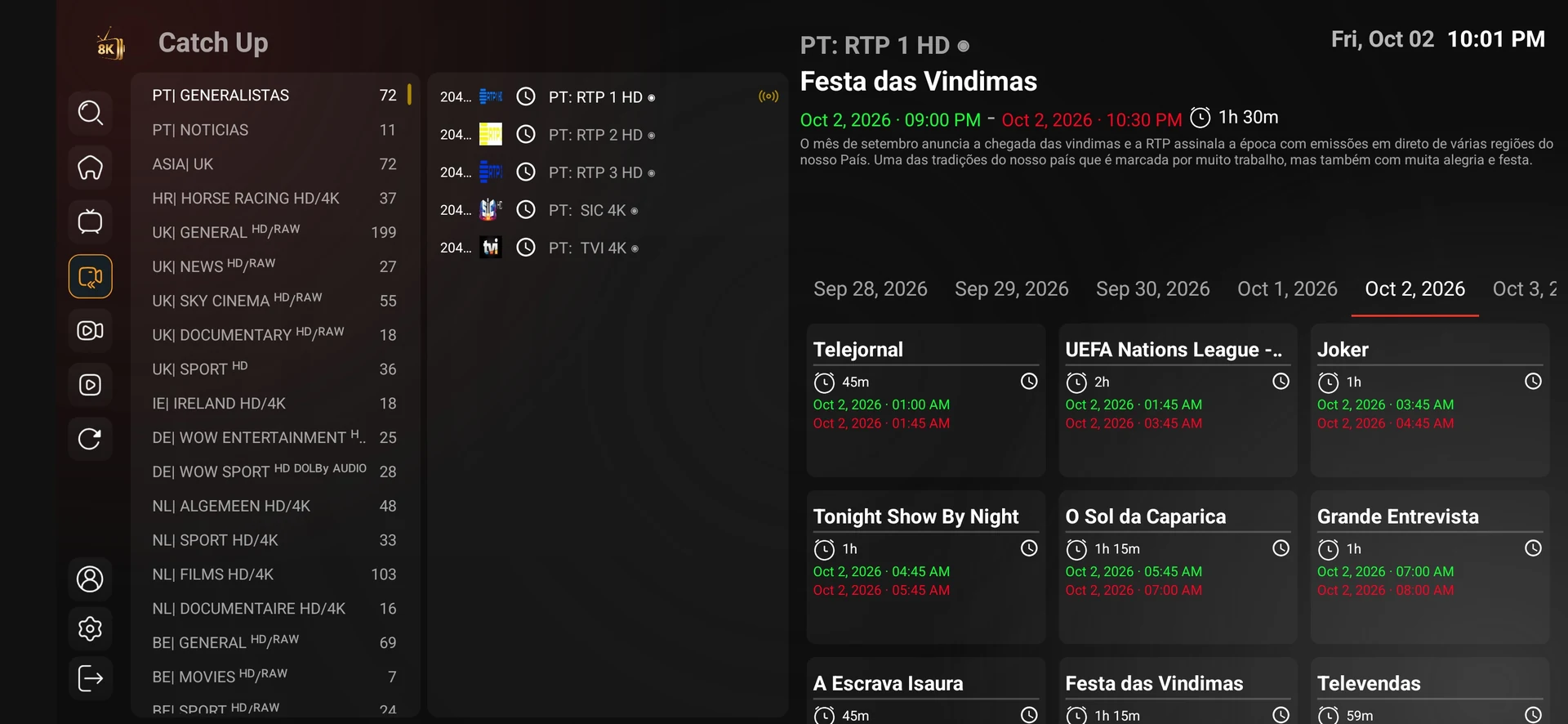
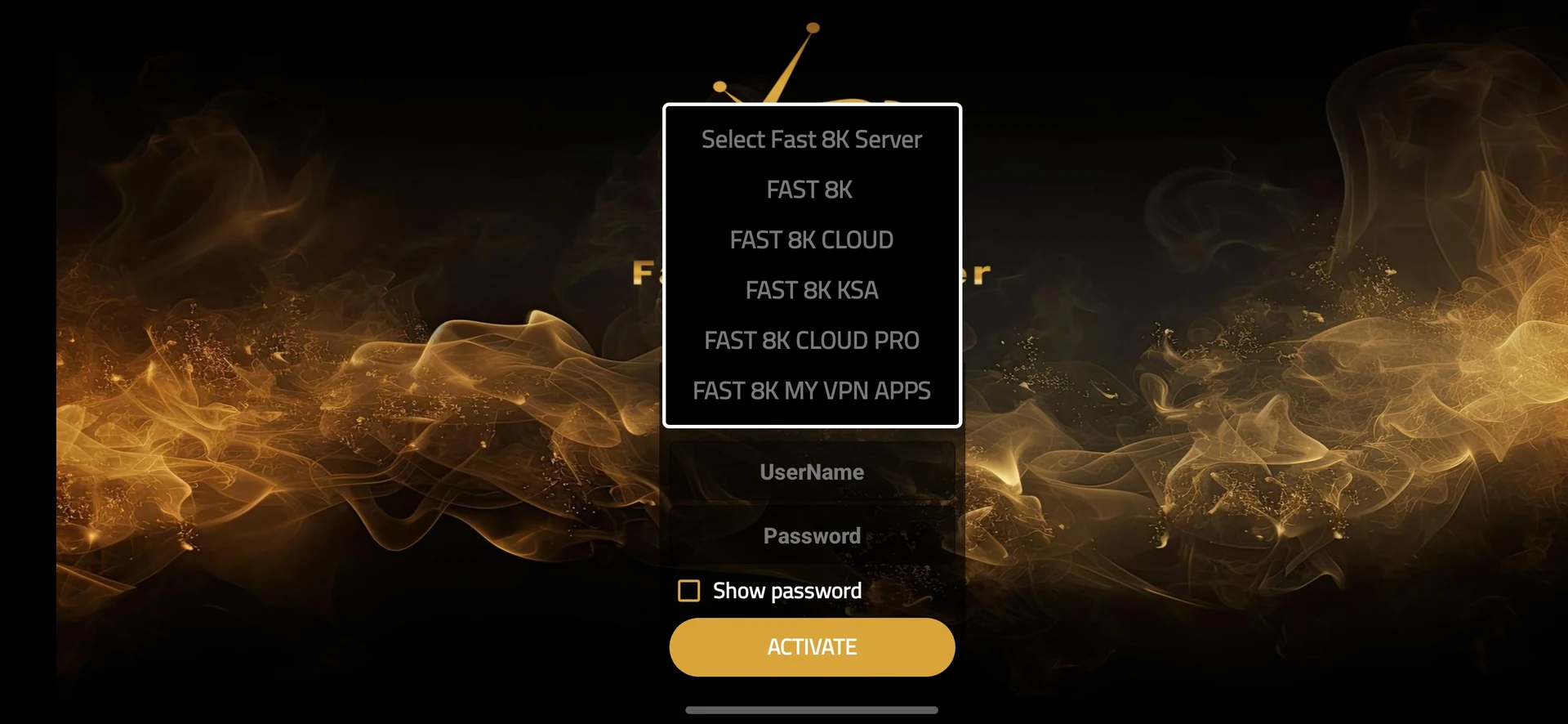
Remote-friendly live channel browsing. The 8kiptv.io screenshots show the Fast 8K Player interface. Category lists and channel names in these screens are examples from the version.
Read the guideCode 6124314
8K Player Plus
An alternative provider-listed player. Ask which account format and activation method apply to the downloaded build. A Plus label does not establish extra simultaneous connections.
Read the guideCode 9149440
8K Player Prime
Another interface for a compatible account. Confirm the exact player name before entering your credentials. Prime here is a player label and does not represent an Amazon Prime Video subscription.
Read the guideCode 1388878
8K Player VIP+
The VIP+ provider download entry. VIP and VIP+ are separate download entries. Record which one is installed so that a support request can identify the correct build.
Read the guideCode 3928090
Strong_Snap old
The legacy provider-listed player. This entry is explicitly marked old in the source download list. Ask support whether the legacy build is still appropriate before installing or replacing a working player.
Read the guideCode 8897049
Strong power
A further provider-listed Android player. Use the published entry as a starting point and confirm the current destination with support. No version number or separate feature entitlement was supplied.
Read the guideA player and an account are separate
The application supplies browsing and playback controls. The subscription supplies account access for its agreed term and connection count. A player name does not guarantee extra devices, native 8K video or a particular channel.
The code list is dated 29 May 2026. Shortened download destinations and installed builds can change. Confirm the current source and supported operating system before installing a package.
8K IPTV · heroes
Your viewing guide

Players and apps
Explore VIP+, Fast 8K, Prime and the other listed players. Match the app to your device and account.
Check current channels, titles and events. Platform memberships are separate.
Read the full details
Players and apps
A player that
fits your setup.
Explore VIP+, Fast 8K, Prime and the other listed players. Match the app to your device and account.
Check current channels, titles and events. Platform memberships are separate.
FIND YOUR PLAYER
PLAYERS AND APPS
Explore VIP+, Fast 8K, Prime and the other listed players.
Match the app to your device and account.
PLATFORMS & BROADCASTERS
SPORTS & EVENTS
Check current channels, titles and events • Platform memberships are separate.
Explore VIP+, Fast 8K, Prime and the other listed players. Match the
app to your device and account.
Check sources and titles. Platform memberships are separate.
PLAYER & ACCOUNT
Explore VIP+, Fast 8K, Prime and the other listed players. Match
the app to your device and account.
YOUR PLAYER. YOUR VIEWING.
Check current channels, titles and events. Platform memberships are
separate.

Your first viewing session
A clear path from player to first play.
Read the applicable account and player conditions before ordering.
Read the full details
Your first viewing session
A clear path from player to first play.
Identify your device
Match the confirmed player
Use the issued account instructions
Read the applicable account and player conditions before ordering.
EXPLORE YOUR NEXT STEP
PLAYER & ACCOUNT
YOUR FIRST VIEWING SESSION
Your first viewing
session
PLATFORMS & BROADCASTERS
SPORTS & EVENTS
YOUR PLAYER. YOUR VIEWING.
Match the operating system
Android-compatible packages require a supported Android-based device. Native Tizen, webOS, iOS and tvOS routes depend on the relevant app store and player. Desktop entries have their own installer or disk-image formats.
Other compatible-player questions
Third-party player options
Confirm the current edition and account format. Use these guides to confirm the account format and test compatibility.
Existing player reference
8K PRO with XCIPTV
Check the exact XCIPTV edition, device support, account format and first-playback result for an 8K PRO account.
Read the guideExisting player reference
8K PRO with Kodi
Check the exact Kodi edition, device support, account format and first-playback result for an 8K PRO account.
Read the guideExisting player reference
8K PRO with Duplex Play
Check the exact Duplex Play edition, device support, account format and first-playback result for an 8K PRO account.
Read the guideExisting player reference
8K PRO with NET IPTV
Check the exact NET IPTV edition, device support, account format and first-playback result for an 8K PRO account.
Read the guideExisting player reference
8K PRO with MyIPTV Player
Check the exact MyIPTV Player edition, device support, account format and first-playback result for an 8K PRO account.
Read the guideExisting player reference
8K PRO with Smarters Player Lite
Check the exact Smarters Player Lite edition, device support, account format and first-playback result for an 8K PRO account.
Read the guideExisting player reference
8K PRO with TiviMate
Check the exact TiviMate edition, device support, account format and first-playback result for an 8K PRO account.
Read the guideExisting player reference
8K PRO with SET IPTV
Check the exact SET IPTV edition, device support, account format and first-playback result for an 8K PRO account.
Read the guideExisting player reference
8K PRO with GSE Smart IPTV
Check the exact GSE Smart IPTV edition, device support, account format and first-playback result for an 8K PRO account.
Read the guideExisting player reference
8K PRO with Flix IPTV
Check the exact Flix IPTV edition, device support, account format and first-playback result for an 8K PRO account.
Read the guideExisting player reference
8K PRO with IPTV Smarters Pro
Check the exact IPTV Smarters Pro edition, device support, account format and first-playback result for an 8K PRO account.
Read the guideExisting player reference
8K PRO with VLC
Check the exact VLC edition, device support, account format and first-playback result for an 8K PRO account.
Read the guideExisting player reference
8K PRO with IBO Player
Check the exact IBO Player edition, device support, account format and first-playback result for an 8K PRO account.
Read the guideExisting player reference
8K PRO with Perfect Player
Check the exact Perfect Player edition, device support, account format and first-playback result for an 8K PRO account.
Read the guideExisting player reference
8K PRO with SmartOne IPTV
Check the exact SmartOne IPTV edition, device support, account format and first-playback result for an 8K PRO account.
Read the guideExisting player reference
8K PRO with OTT Navigator
Check the exact OTT Navigator edition, device support, account format and first-playback result for an 8K PRO account.
Read the guideExisting player reference
8K PRO with IPTV Extreme
Check the exact IPTV Extreme edition, device support, account format and first-playback result for an 8K PRO account.
Read the guideExisting player reference
8K PRO with Televizo
Check the exact Televizo edition, device support, account format and first-playback result for an 8K PRO account.
Read the guideExisting player reference
8K PRO with IBO Player Pro
Check the exact IBO Player Pro edition, device support, account format and first-playback result for an 8K PRO account.
Read the guideExisting player reference
8K PRO with SS IPTV
Check the exact SS IPTV edition, device support, account format and first-playback result for an 8K PRO account.
Read the guideCloud, KSA and account choices
Find the full label on your screen.
8K Pro account selection
8K PRO
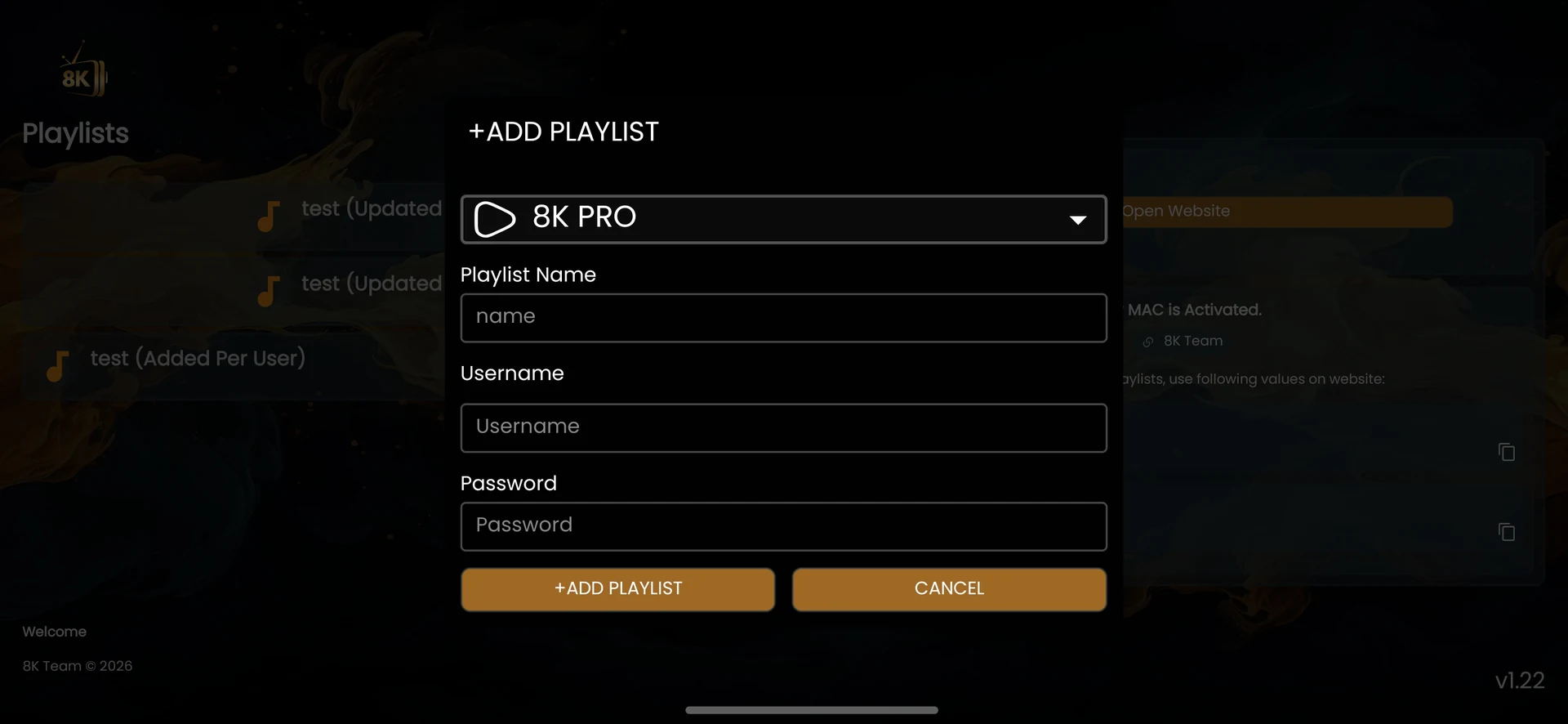
Choose 8K PRO from the VIP+ Add Playlist dropdown. Its position above the Cloud variants does not assign your account to it automatically.
Read the guideCloud account selection
8K Pro Cloud
Choose 8K PRO CLOUD only when support has issued that account route. A working 8K PRO login is not proof that it will work under Cloud.
Read the guideCloud Pro account selection
8K Pro Cloud Pro
The screenshot lists 8K PRO CLOUD PRO separately from 8K PRO CLOUD. Preserve the full name when reporting a login problem; do not remove the second Pro label.
Read the guideVPN-labelled account route
8K My VPN Apps
8K MY VPN APPS appears as a server choice in the player. The label alone does not establish a standalone VPN application, encrypted tunnel or geographic access guarantee.
Read the guideFast account selection
Fast 8K Server
Select FAST 8K in the server control on the Fast 8K Player activation screen, then use the matching issued username and password.
Read the guideCloud server selection
Fast 8K Cloud
FAST 8K CLOUD is a separate Fast-player server choice. Record this selection with the account login instead of changing servers at random during a playback test.
Read the guideKSA-labelled server selection
Fast 8K KSA
The menu shows FAST 8K KSA. The name does not establish physical server location, Saudi-only eligibility or a different language catalogue; confirm those details directly.
Read the guideCloud Pro server selection
Fast 8K Cloud Pro
Use FAST 8K CLOUD PRO when it is the account route by support. Cloud Pro is not a documented promise of higher resolution, extra connections or a larger catalogue.
Read the guideFast VPN-labelled selection
Fast My VPN Apps
The exact menu wording is FAST 8K MY VPN APPS. It is a visible account choice inside Fast 8K Player; no separate VPN installer, tunnel protocol or privacy specification was supplied.
Read the guideVIP playlist selection
8K VIP
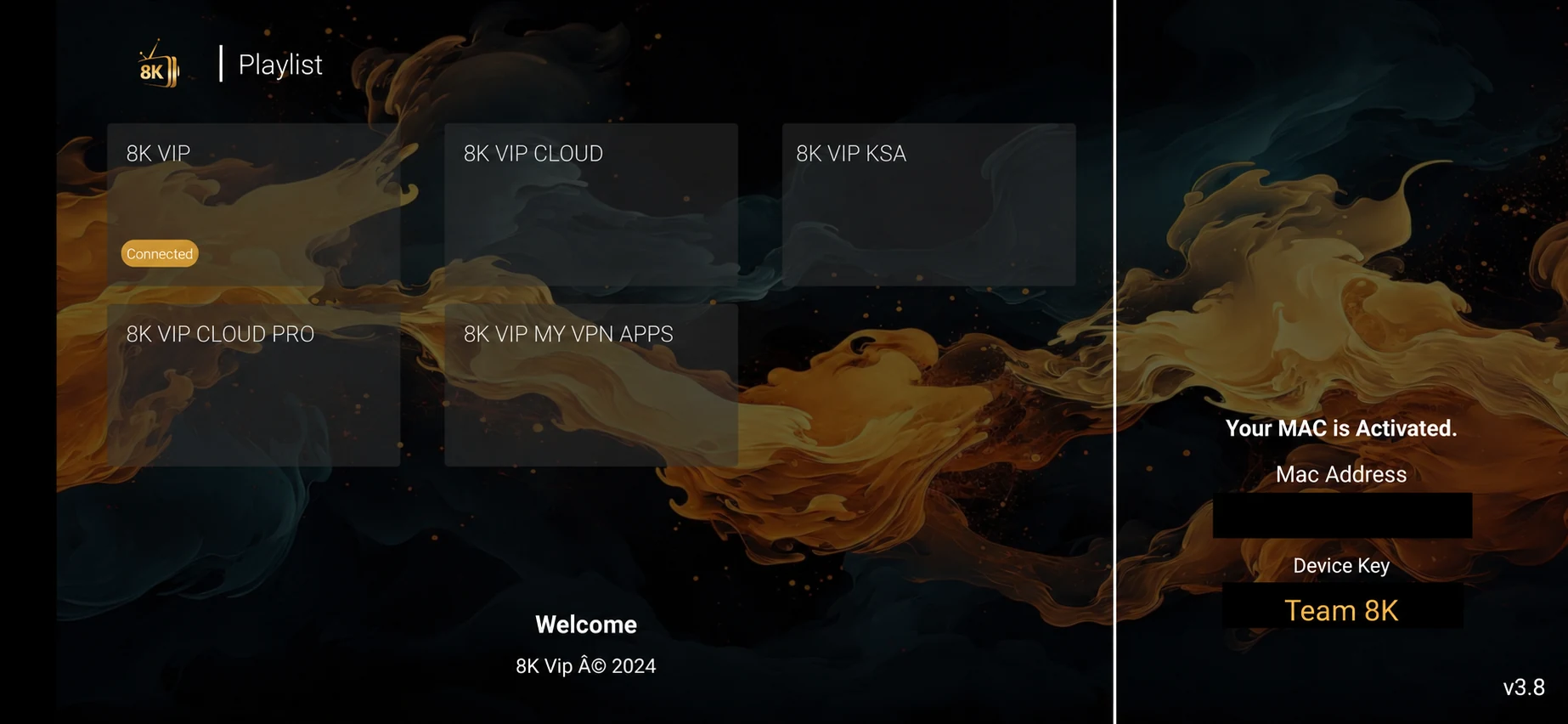
Use the 8K VIP playlist tile for the matching issued VIP account. The Connected status shown in the example reflects the screenshot, not the status of your own login.
Read the guideVIP Cloud playlist selection
8K VIP Cloud
Choose the 8K VIP CLOUD tile only for the account route support names. Confirm the installed VIP version because VIP and VIP+ expose different account-selection interfaces.
Read the guideVIP KSA playlist selection
8K VIP KSA
The VIP interface contains an 8K VIP KSA tile. Ask about eligibility and account routing; the label alone does not verify a specific server country or content entitlement.
Read the guideVIP Cloud Pro playlist selection
8K VIP Cloud Pro
8K VIP CLOUD PRO is distinct from 8K VIP CLOUD in the tile view. Keep the full tile name with the support record so that a different route is not tested by mistake.
Read the guideVIP VPN-labelled playlist selection
8K VIP My VPN Apps
The menu shows 8K VIP MY VPN APPS inside the VIP player. Treat it as an operator-confirmed account choice; no separate VPN download or privacy guarantee was provided.
Read the guideInstalled the app?
WhatsApp us for a one-day free trial.
Tell us your device, your player and the account option shown in the player. Support supplies the correct trial login and confirms availability.
Find your next step
Player, account or subscription?
Guide
8K VIP+ Player
Code, real screenshots and account route.
Read the guideGuide
Fast 8K Player
Server selector and activation checks.
Read the guideGuide
8K IPTV subscription plans
Compare the complete USD totals.
Read the guideExplore this viewing option